WorkforceProduct guide

Customizable task workflows

Farmroute does not force harvesting, inspections, maintenance, inventory, and safety work into the same checklist. Build each operation on a visual canvas, choose the exact data and proof it needs, control what workers must complete, preview the mobile flow, and preserve every answer as structured task data.

  • Visual operations canvas
  • Text, number, currency, weight and quantity inputs
  • Date, time, dropdown and multi-select controls
  • Automatic worker attribution
  • Photo, file and camera evidence
  • QR and barcode scanning
  • Acknowledgements and signatures
  • Mandatory and optional steps
  • Piece-rate payroll actions
  • Preview and structured results

Inside the app

See the workflow.

Actual Farmroute screens from the farm and employee demo accounts.

01 · Compose

Build on a visual operations canvas.

Start with the result the farm needs, connect each required decision in order, and keep the reusable definition visible as one complete operation.

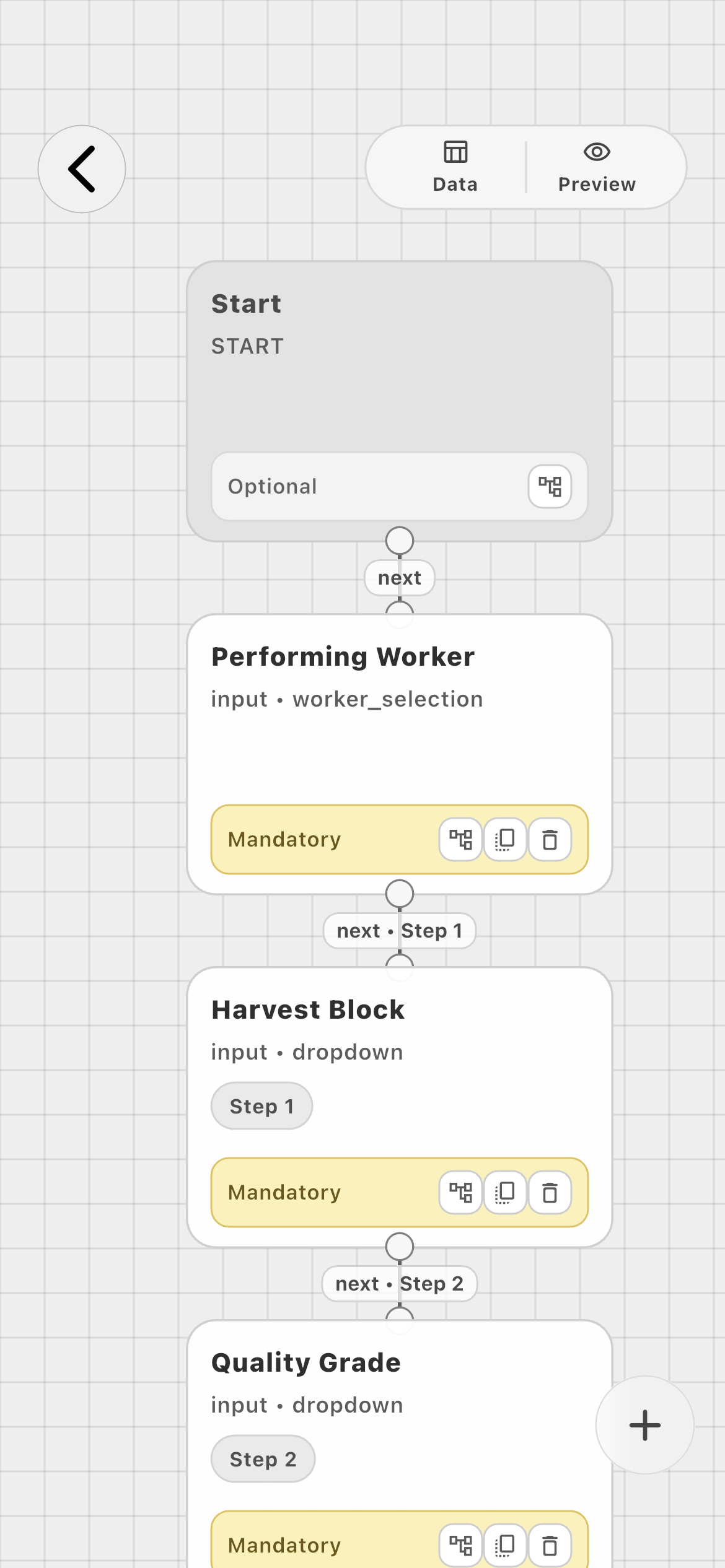
Connected operation01
Visual workflow canvas connecting Performing Worker, Harvest Block, and Quality Grade task blocks
Start, worker attribution, choices, quantities, and later actions are connected in the order employees will complete them.
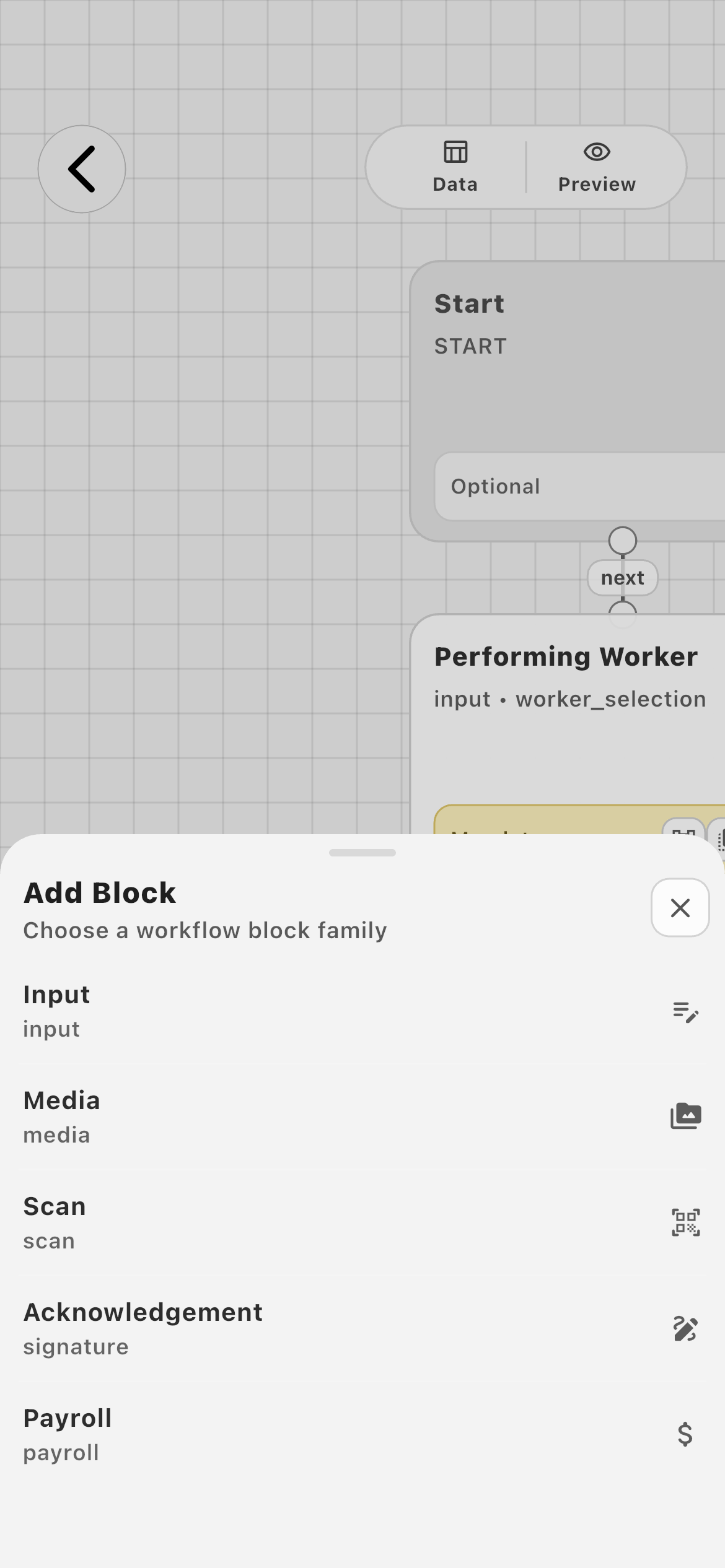
Block families02
Farmroute Add Block menu listing Input, Media, Scan, Acknowledgement, and Payroll families
Input, Media, Scan, Acknowledgement, and Payroll families cover both operational data and proof.
02 · Inputs

Choose the exact data type the operation needs.

Use typed values instead of burying measurements and decisions in a notes field. The saved result remains understandable after the work is finished.

Typed inputs01
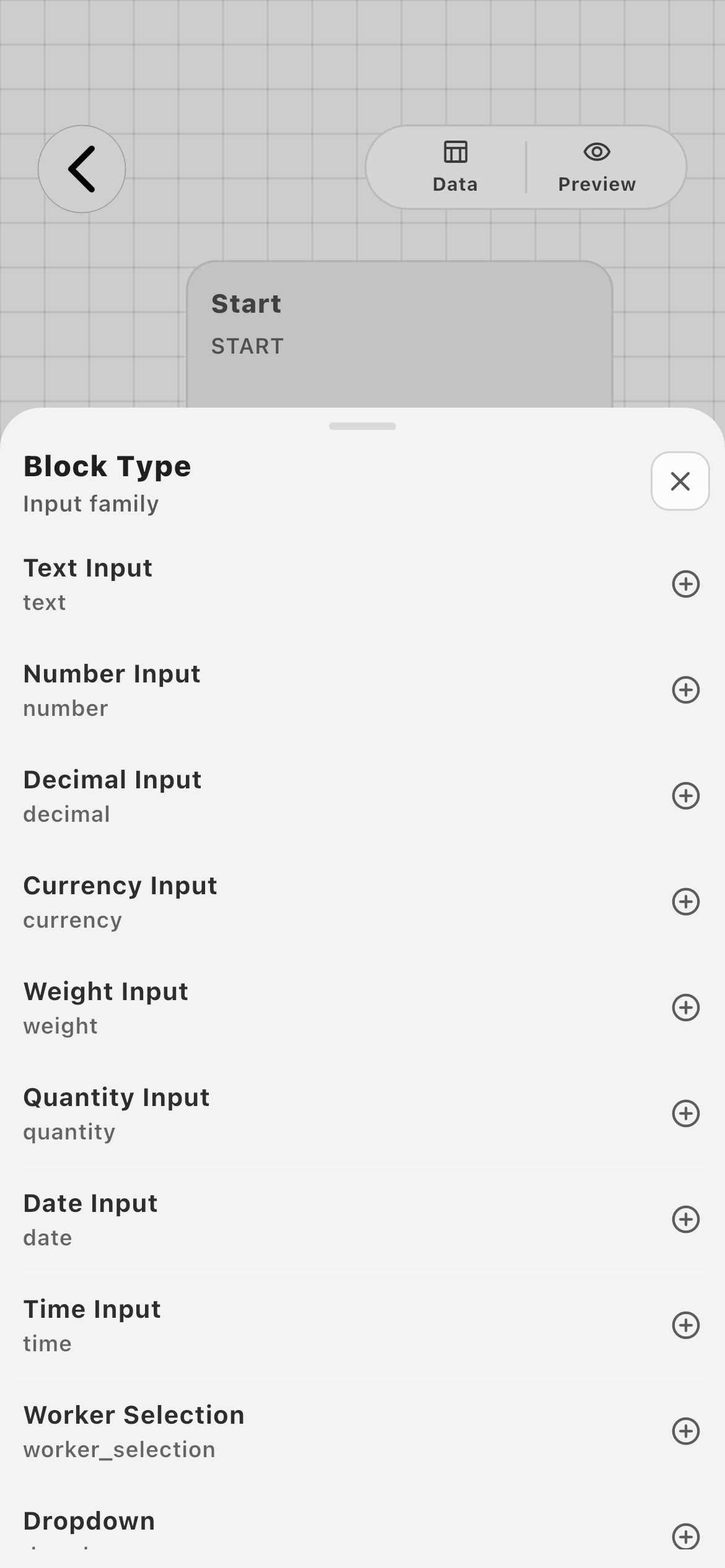
Farmroute input block types including text, number, decimal, currency, weight, quantity, date, time, worker selection, and dropdown
Text Input, Number Input, Decimal Input, Currency Input, Weight Input, Quantity Input, Date Input, Time Input, Worker Selection, Dropdown, and Multi-Select are selected deliberately.
Configured choice02
Employee selecting a configured Harvest Block task value
A farm-authored dropdown becomes a focused Harvest Block decision for the worker.
Operational language03
Employee selecting a configured Quality Grade task value
Labels and choices can match the farm’s own grading system instead of a generic status list.
Measured output04
Employee entering a tote quantity in a configured task
Quantity and measurement blocks capture usable values rather than a completed checkbox.
03 · Evidence

Collect proof and machine-readable identifiers.

Add evidence only where it matters: a photo of the completed repair, a source file, a camera capture, or a scan that identifies the correct item or person.

Media evidence01
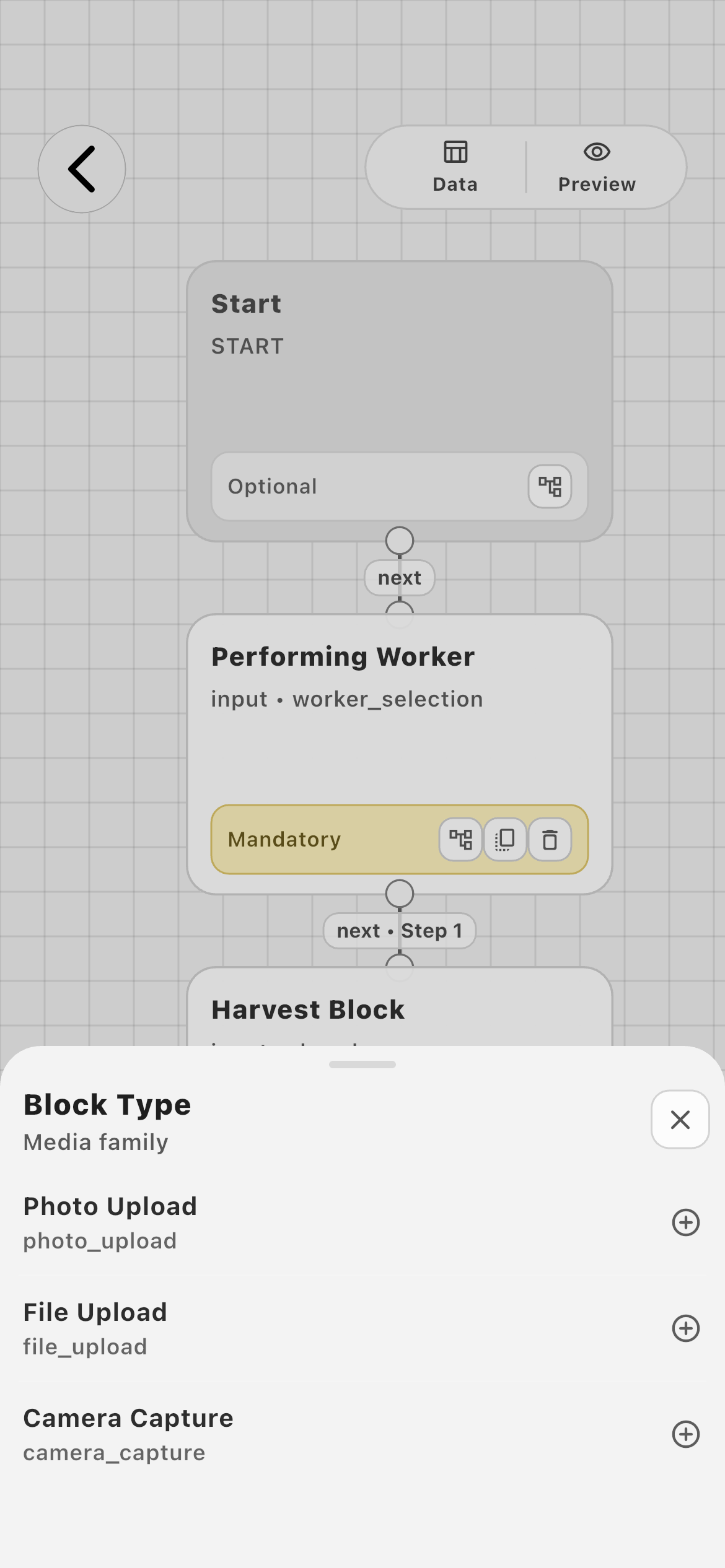
Farmroute Media block types with Photo Upload, File Upload, and Camera Capture
Photo Upload, File Upload, and Camera Capture keep supporting evidence with the task result.
Scan actions02
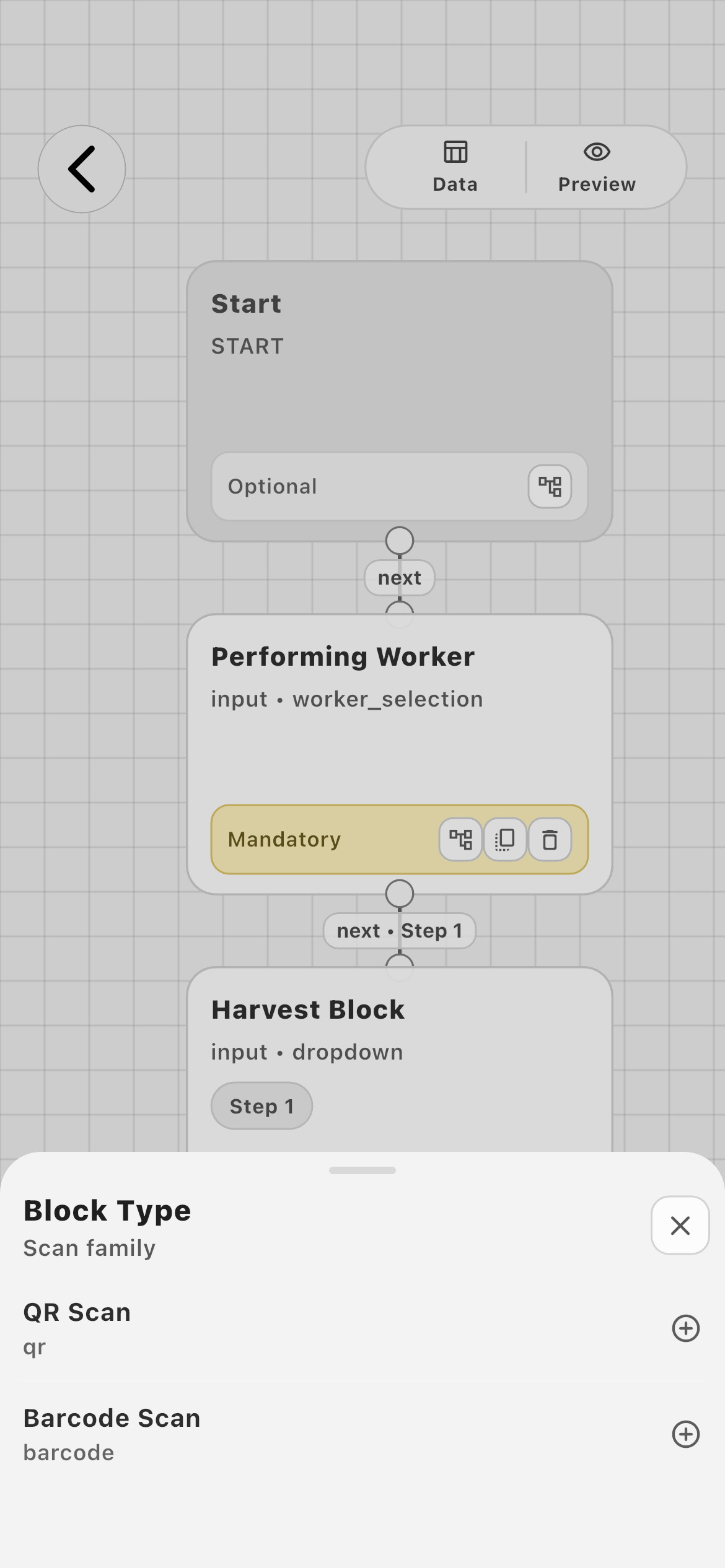
Farmroute Scan block types with QR Scan and Barcode Scan
QR Scan and Barcode Scan can identify supported Farmroute IDs and task targets without retyping identifiers.
04 · Responsibility

Control attribution, acknowledgement, and compensation.

The workflow can identify who performed the work, require the right confirmation, and connect measured output to the intended compensation rule.

Worker attribution01
Farmroute workflow showing a mandatory Performing Worker block
Worker Selection can be explicit, automatically use the performing worker, or stay hidden when assignment already supplies the identity.
Acknowledgement02
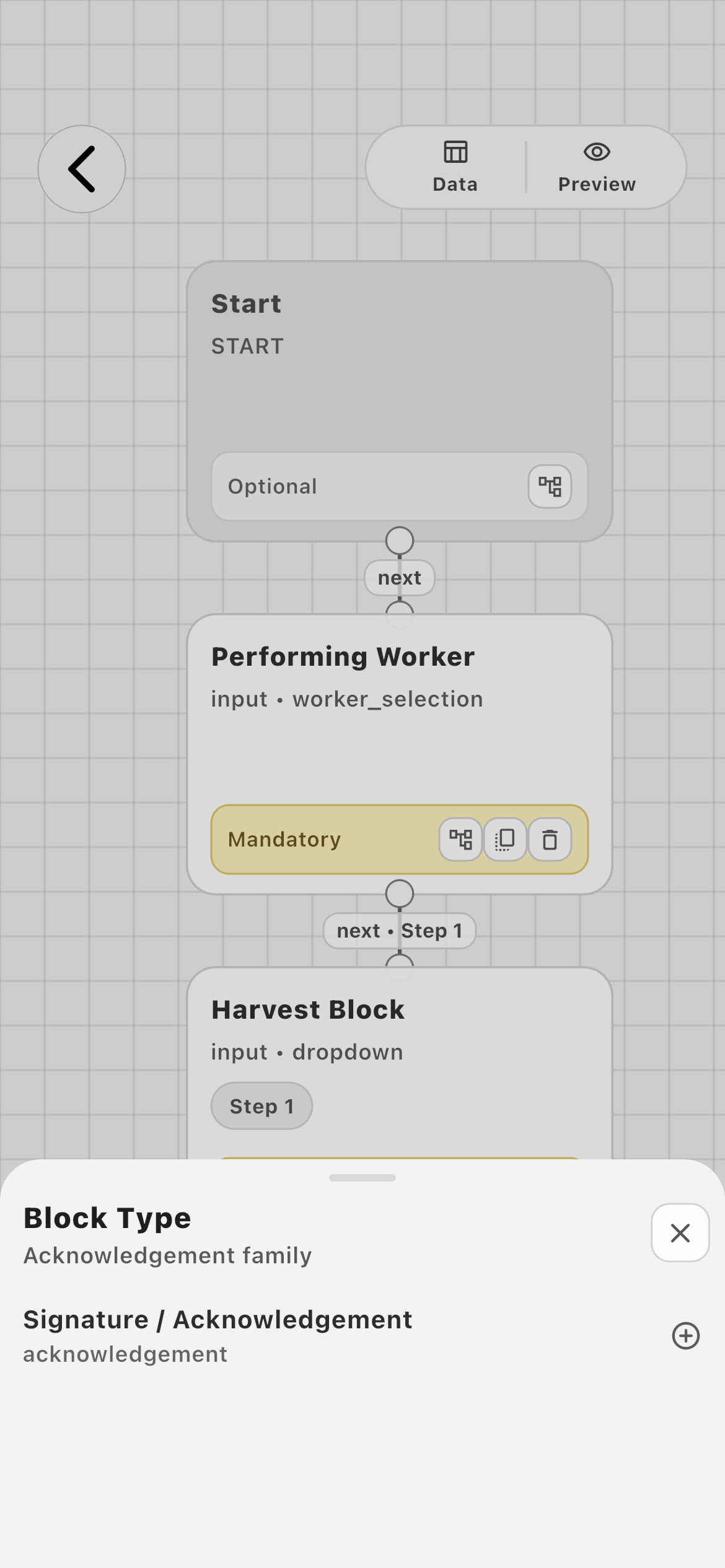
Farmroute Signature and Acknowledgement task block type
Signature / Acknowledgement adds an intentional confirmation where the operation requires one.
Compensation03
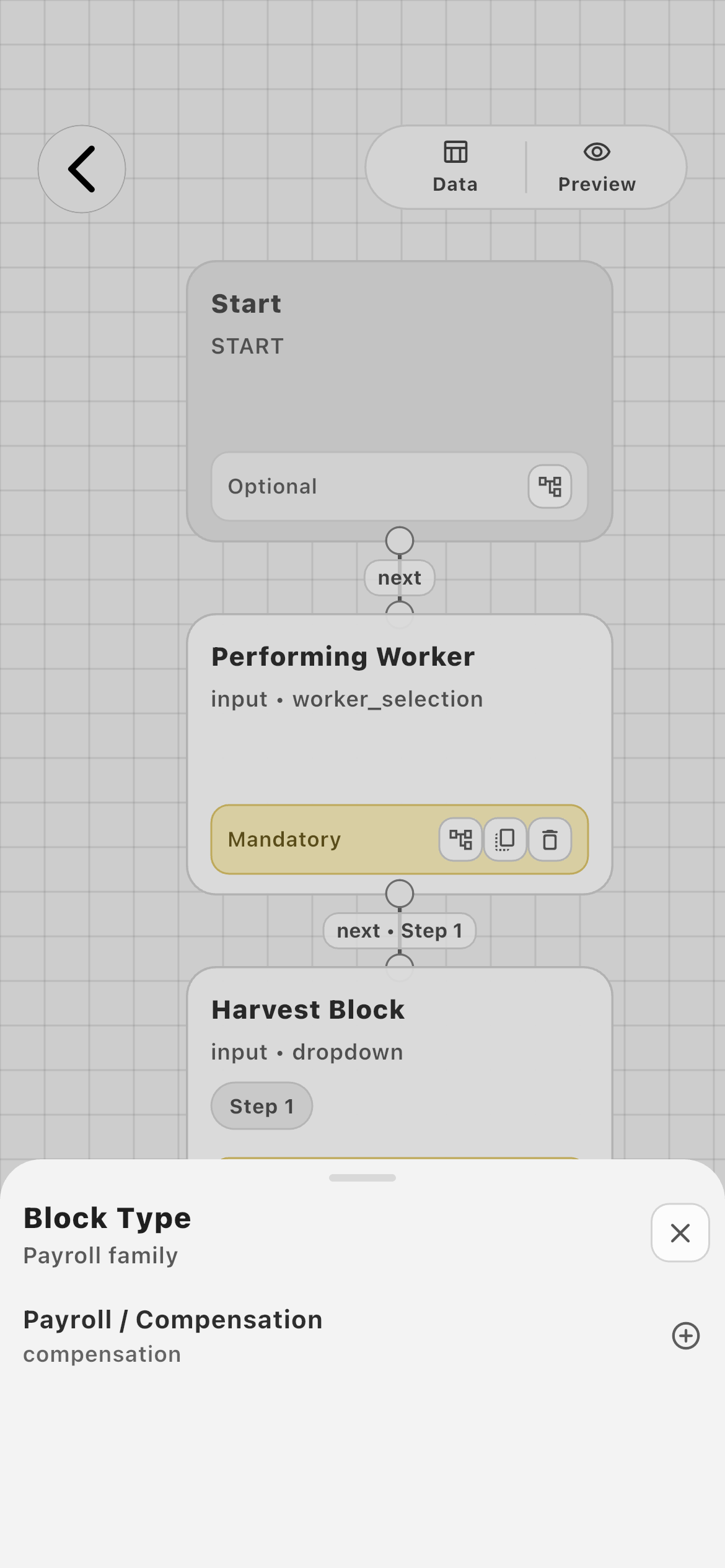
Farmroute Payroll and Compensation task block type
Payroll / Compensation can connect a worker and a quantity or weight source to the correct pay profile and piece type.
05 · Worker flow

Turn configuration into one guided decision at a time.

Workers never have to interpret the node canvas. They receive numbered progress, farm-authored context, and only the control configured for the current step.

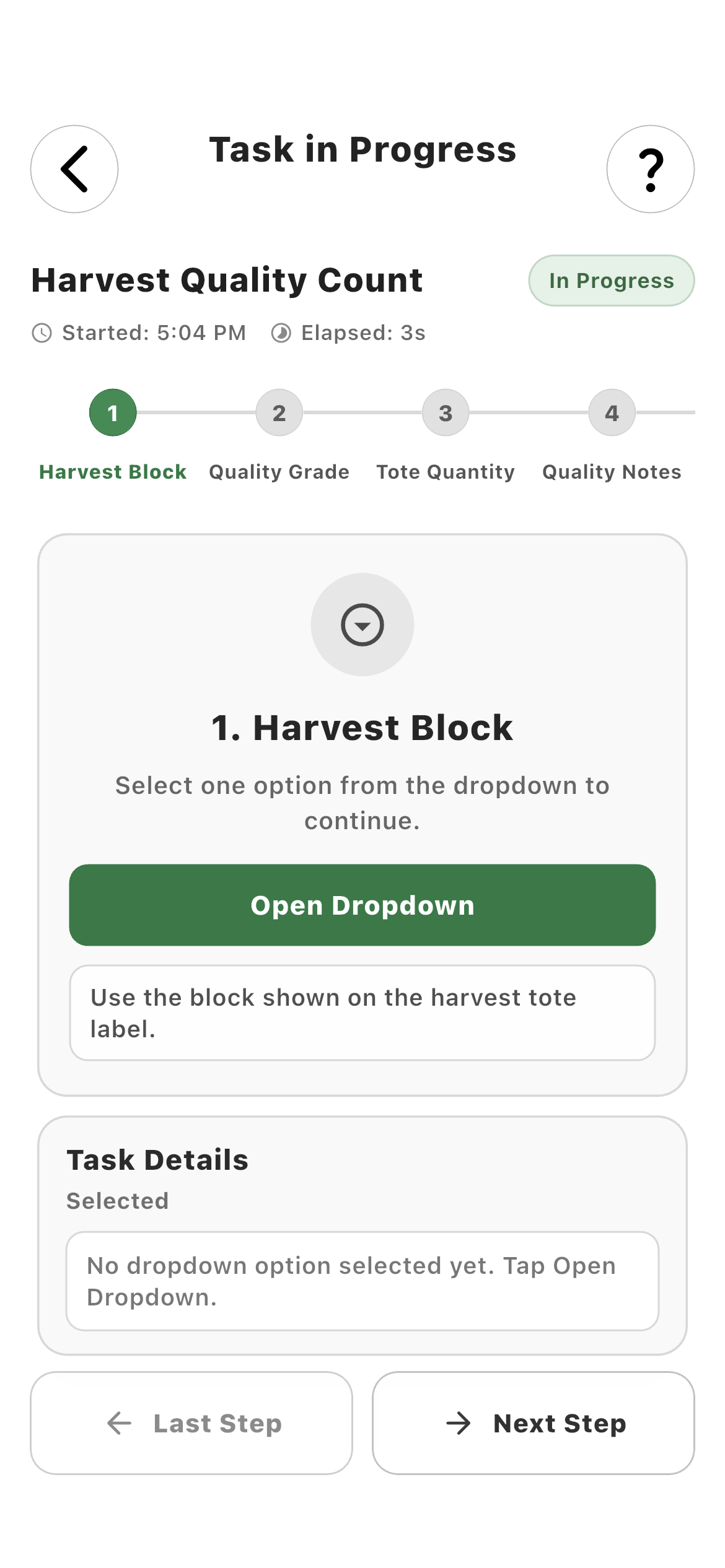
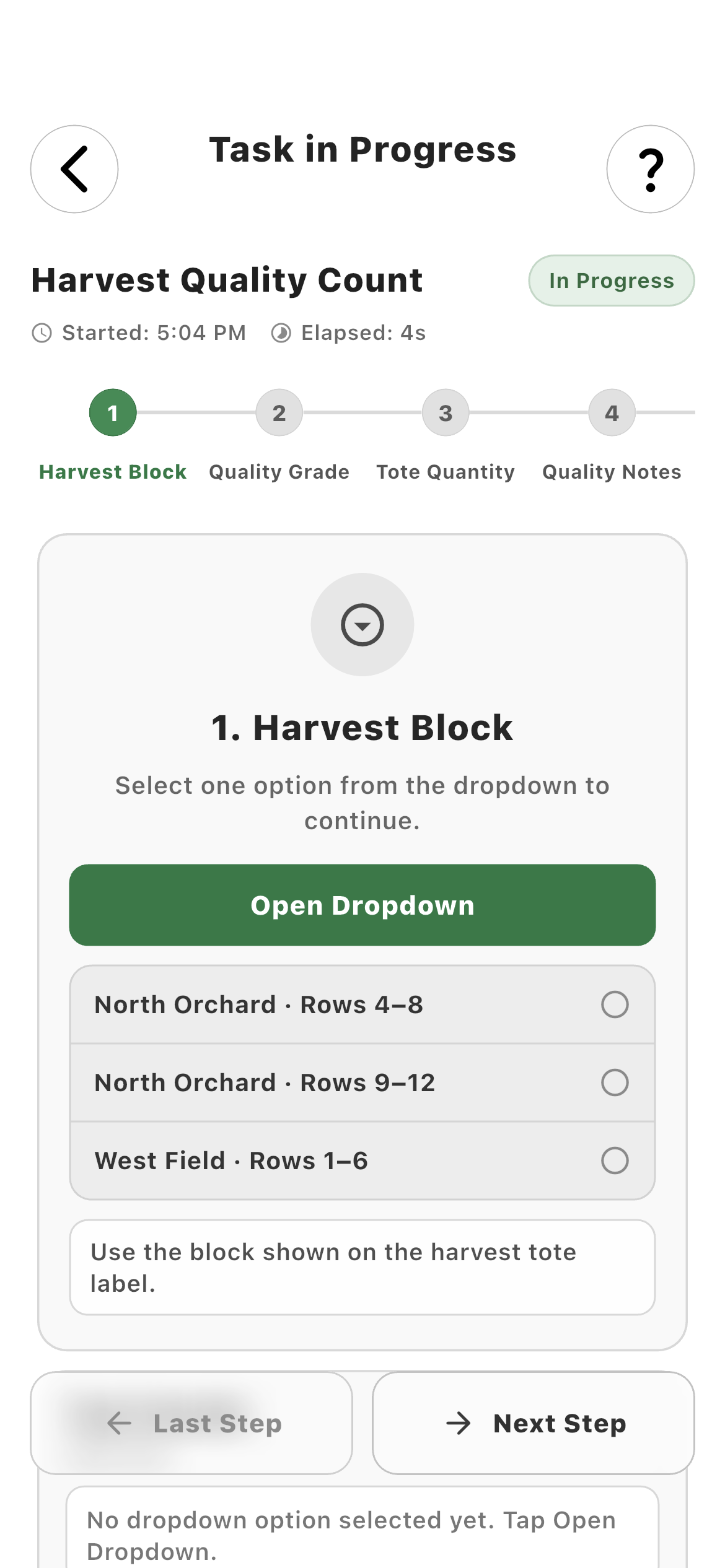
Step one01
Employee Harvest Block step in a Farmroute task
The first configured choice establishes where the work occurred.
Farm choices02
Employee Harvest Block dropdown choices
Only the options authored for this operation appear.
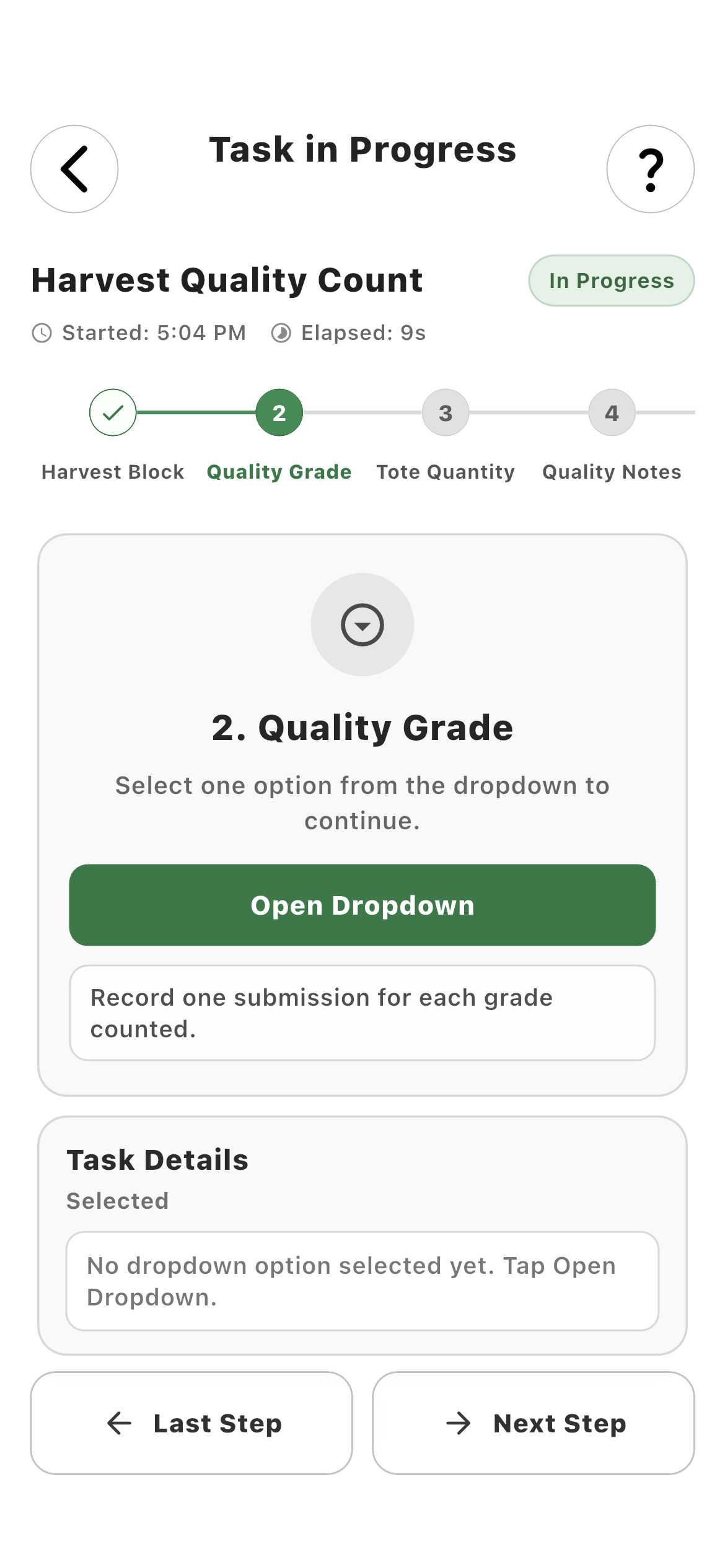
Step two03
Employee Quality Grade step
The next block collects a separate structured grading decision.
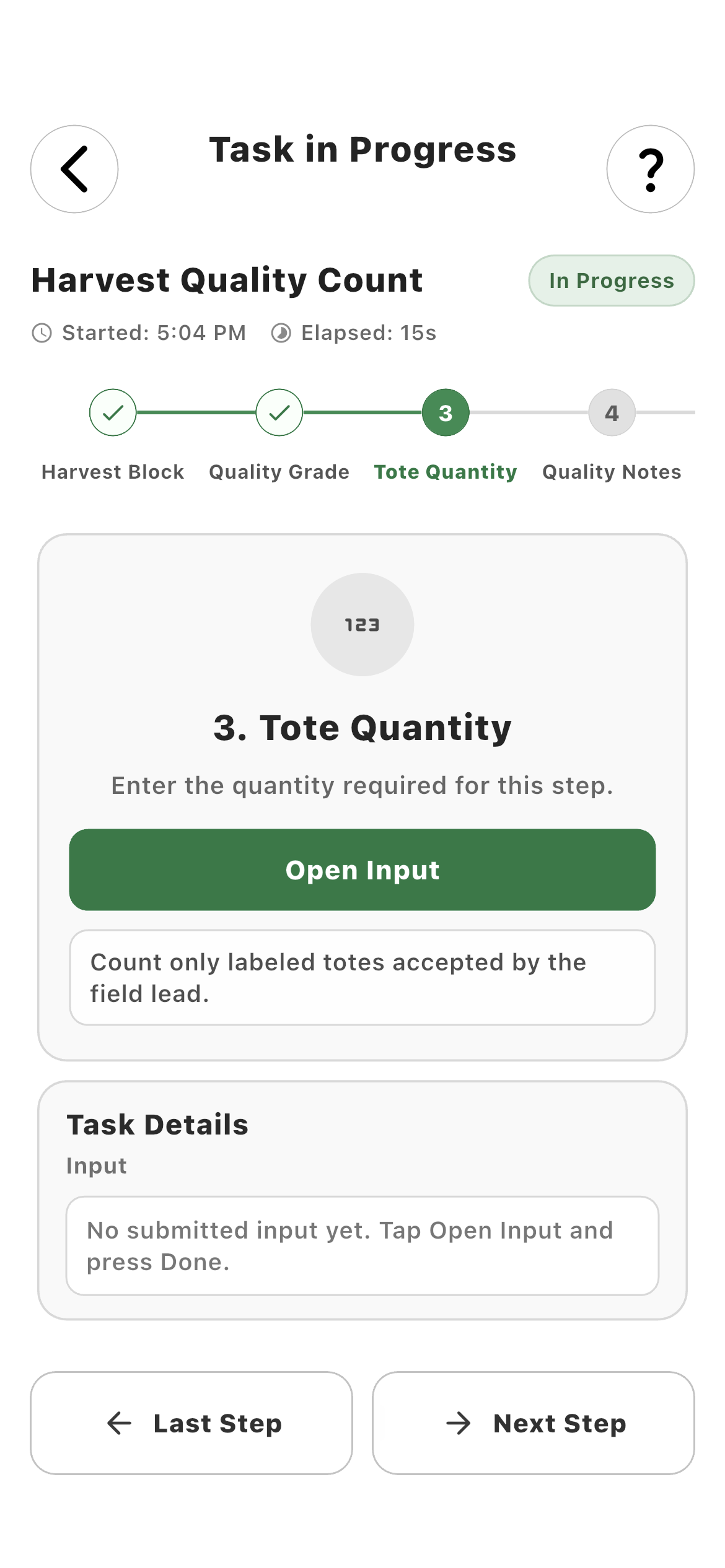
Step three04
Employee Tote Quantity step
A mandatory quantity step records the measurable output before submission.
06 · Results

Keep the structured output behind every completion.

The task result retains the worker, selected values, measurements, timestamps, and connected evidence so the farm can inspect what happened—not only that it happened.

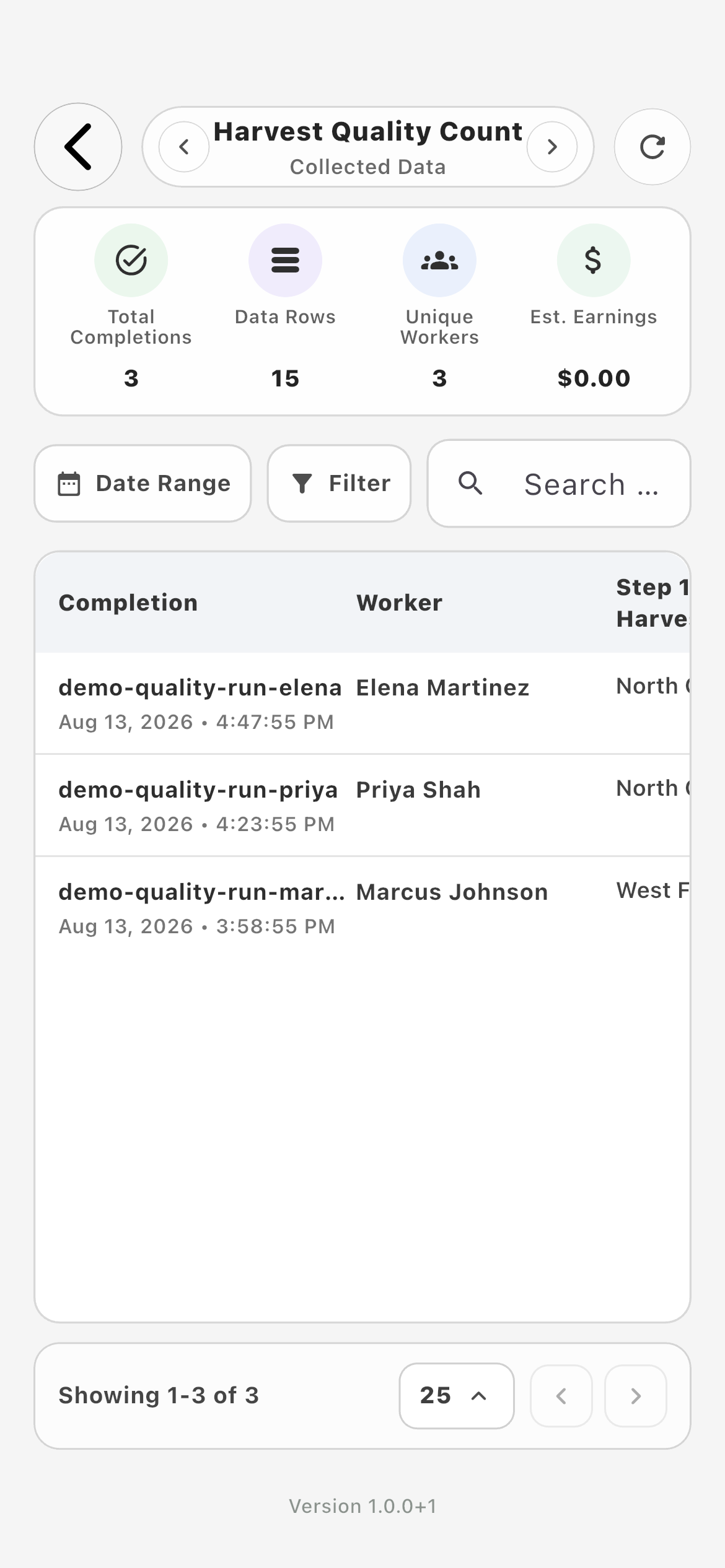
Task data01
Farmroute farm task Data page showing structured task results
Named outputs stay attached to the completed task run for review and operational records.

How it works in practice

Built around the workday.

01
Typed operational data

Use the control that matches the answer.

Text, number, decimal, currency, weight, quantity, date, and time blocks preserve meaningful value types. Dropdown and multi-select blocks limit answers to the farm’s configured choices, which makes completed work easier to review and compare than unstructured notes.

  • Text, numeric, decimal, and currency values
  • Weight and quantity measurements
  • Date and time capture
  • Dropdown and multi-select choices
02
Worker attribution

Ask for identity only when the workflow actually needs to ask.

Worker Selection can require an explicit choice, automatically select the employee performing the task, or remain hidden when the assignment already establishes identity. This keeps attribution reliable without making every worker select their own name on every run.

  • Explicit worker choice
  • Automatic performing-worker selection
  • Hidden redundant selector
  • Relationship-scoped eligible workers
03
Evidence and scanning

Attach proof to the operation that produced it.

A workflow can request an existing photo or file, open the camera for new evidence, or use QR and barcode scans to capture a supported identifier. Each of those actions remains part of the task result rather than becoming a disconnected upload.

  • Photo Upload and File Upload
  • Camera Capture
  • QR Scan and Barcode Scan
  • Evidence stored with the result
04
Required behavior

Decide what must happen before the worker can continue.

Every operational block can be mandatory or optional. Mandatory steps stop incomplete work from advancing, while optional notes or evidence remain genuinely skippable. Farm-authored names, choices, and helper text make the requirement understandable in the field.

  • Mandatory progression rules
  • Optional supporting information
  • Farm-authored labels and choices
  • Ordered mobile steps
05
Acknowledgement

Add intentional confirmation to the correct point in the work.

Signature / Acknowledgement blocks can document that a worker reviewed or confirmed the configured requirement. They belong in the workflow next to the relevant instruction or operation instead of as an unrelated form after the task is complete.

  • Deliberate worker confirmation
  • Signature-capable acknowledgement
  • Placed inside the task sequence
  • Saved with the task record
06
Piece-rate connection

Connect measured output to the intended compensation definition.

Payroll / Compensation blocks can use the performing worker plus a quantity or weight result and connect them to a specific pay profile, piece type, and unit. The configuration must identify the intended piece rather than silently selecting the first available rate.

  • Specific worker source
  • Quantity or weight output
  • Named pay profile and piece type
  • Historical rate context after completion
07
Preview and reuse

Test once, then repeat the same standard without rebuilding it.

Preview exposes the worker-facing sequence before assignment. Once the labels, required behavior, choices, and outputs are correct, the farm can reuse the template across eligible workers while preserving the exact task definition and result for each run.

  • Worker preview before assignment
  • Reusable farm-owned template
  • Consistent execution across workers
  • Structured result per run

Roles and responsibility

Who does what.

Farm profile

Model the operation instead of settling for a generic checklist.

The farm owns the reusable workflow and decides which information, evidence, attribution, confirmation, and compensation actions belong in it. Administrators can preview the employee flow before assigning it to workers with a current farm relationship.

  • Compose connected blocks visually
  • Make each step mandatory or optional
  • Configure the language and allowed answers
  • Inspect exact structured output
Employee profile

Perform the process without seeing its administrative machinery.

The employee sees a focused mobile sequence with the current action, context note, numbered progress, and captured values. Farm-only setup, pay-profile configuration, and graph controls stay out of the worker experience.

  • One clear step at a time
  • Only relevant controls shown
  • Required progression enforced
  • Answers preserved during the run

Complete workflow

From start to finish.

  1. 01
    Farm

    Define the output

    Start with what the operation must produce: a decision, measurement, person, evidence item, scan, acknowledgement, or payable unit.

  2. 02
    Farm

    Choose a block family

    Add an Input, Media, Scan, Acknowledgement, or Payroll block according to the kind of result needed.

  3. 03
    Farm

    Choose the precise block type

    Select the correct typed input or action instead of treating every answer as text.

  4. 04
    Farm

    Name and configure the block

    Set its worker-facing label, helper note, allowed choices, precision, evidence behavior, scan target, or linked compensation definition.

  5. 05
    Farm

    Set progression behavior

    Mark the block mandatory or optional and decide whether worker attribution is explicit, automatic, or hidden.

  6. 06
    Farm

    Connect and order the operation

    Arrange the blocks from Start through the exact sequence the worker should perform.

  7. 07
    Farm

    Preview before assignment

    Run the worker view to catch unclear wording, missing choices, or a required step that cannot be completed.

  8. 08
    Farm

    Assign eligible workers

    Reuse the finished template with workers who have a current relationship to the selected farm.

  9. 09
    Employee

    Complete the guided workflow

    Move through one configured action at a time, correct prior values when needed, and satisfy mandatory steps before submission.

  10. 10
    Farm

    Inspect the structured result

    Review worker attribution, selected choices, measurements, evidence, timestamps, and any connected piece-rate output together.

Questions and answers

Frequently asked questions.

What can a custom Farmroute task workflow collect?

A workflow can collect text, numbers, decimals, currency, quantities, weights, dates, times, worker selections, dropdown or multi-select choices, photos, files, camera evidence, QR codes, barcodes, acknowledgements, signatures, and connected compensation output.

Can individual workflow steps be mandatory or optional?

Yes. Each operational block can be mandatory or optional. Mandatory blocks prevent progression until a valid result exists, while optional blocks can be skipped.

Can Farmroute automatically select the worker performing the task?

Yes. Worker Selection can require an explicit choice, automatically use the employee performing the task, or stay hidden when the assignment already provides the correct identity.

Can a workflow require photos, files, QR codes, barcodes, or a signature?

Yes. Media, Scan, and Signature / Acknowledgement block families add those actions directly to the configured worker sequence and retain the result with the task record.

Can a task workflow connect to piece-rate tracking?

Yes. Payroll / Compensation can connect a worker source and a quantity or weight result to a specific pay profile, piece type, and unit while retaining the applicable historical rate context after completion.

Can the same custom task be assigned more than once?

Yes. The farm owns a reusable template, previews it once, and can assign it to eligible workers repeatedly. Each task run retains its own structured result.

What does the employee see when performing a custom workflow?

The employee sees one configured action at a time with farm-authored labels, notes, numbered progress, elapsed time, and captured values. They do not see the visual builder or farm-only configuration.

What happens to a task workflow when a device goes offline?

The app preserves local progress and reconciles from its latest checkpoint when connectivity returns. Real-time events improve delivery speed, while the saved database record remains the source of truth.
Get started

Build your operation with Farmroute.

We pride ourselves on transparency. No need to call for a quote.