Employees clock in from their assigned shift, clock out for breaks, and return without replacing earlier sessions. Farms receive the exact timestamps, elapsed work, attendance considerations, and finalized hours needed for records and gross-pay estimates.
Employee mobile clock-in
Multiple work sessions
Early and late attendance
Live farm visibility
Forced clock-out
Exact payroll hours
Inside the app
See the workflow.
Actual Farmroute screens from the farm and employee demo accounts.
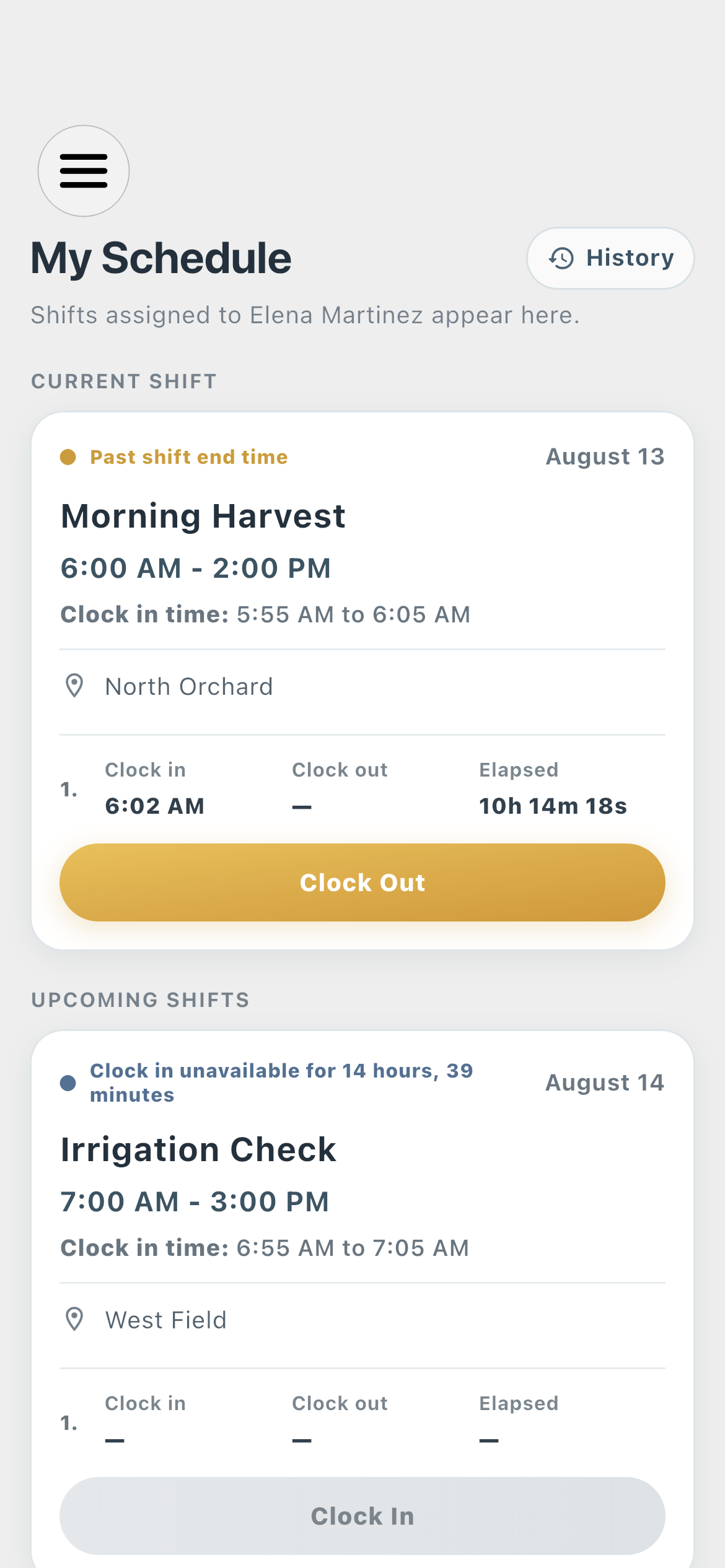
Employee time clock01
The employee starts from the assigned shift and sees clock-in availability, the accepted window, elapsed work, and the Clock In or Clock Out action.
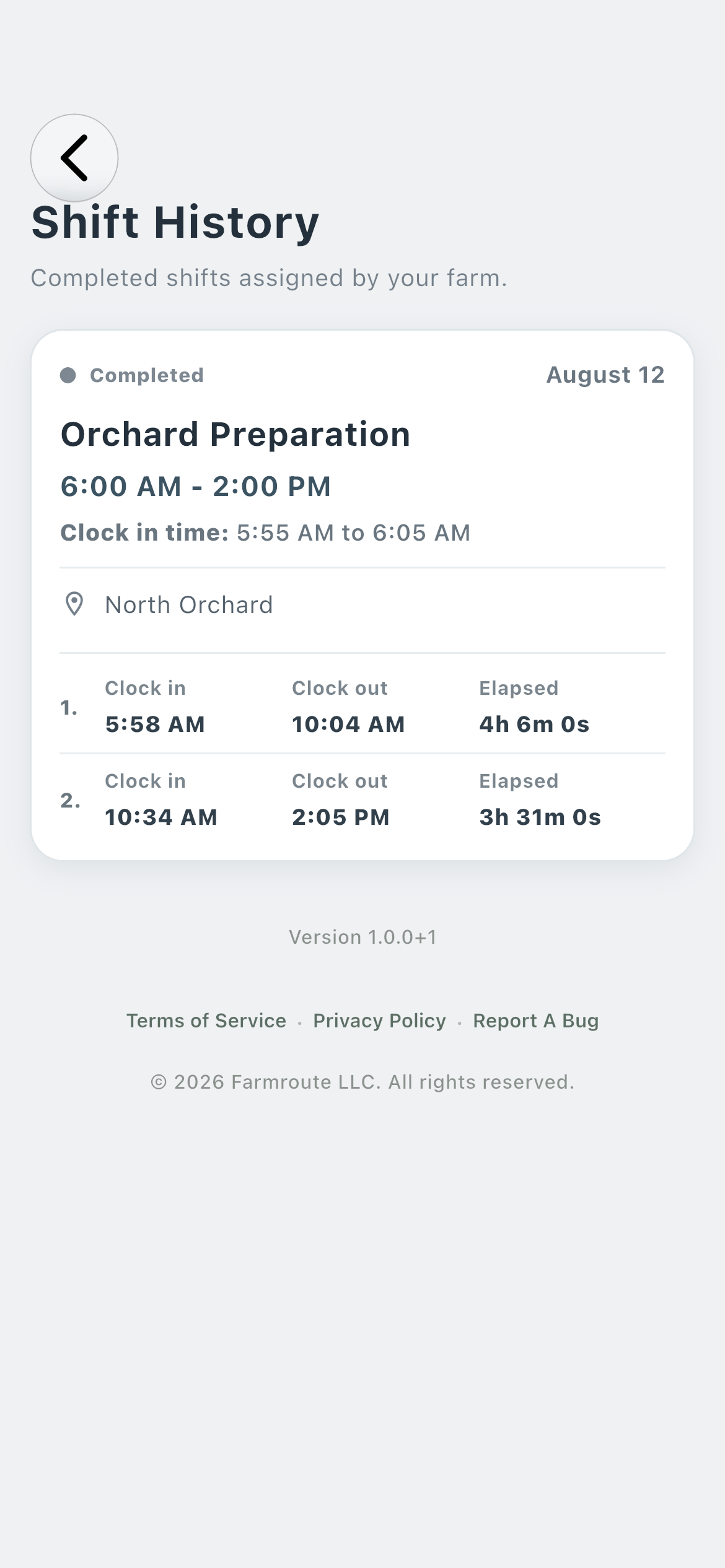
Employee history02
A completed shift retains each clock-in and clock-out pair separately, including a break between sessions.
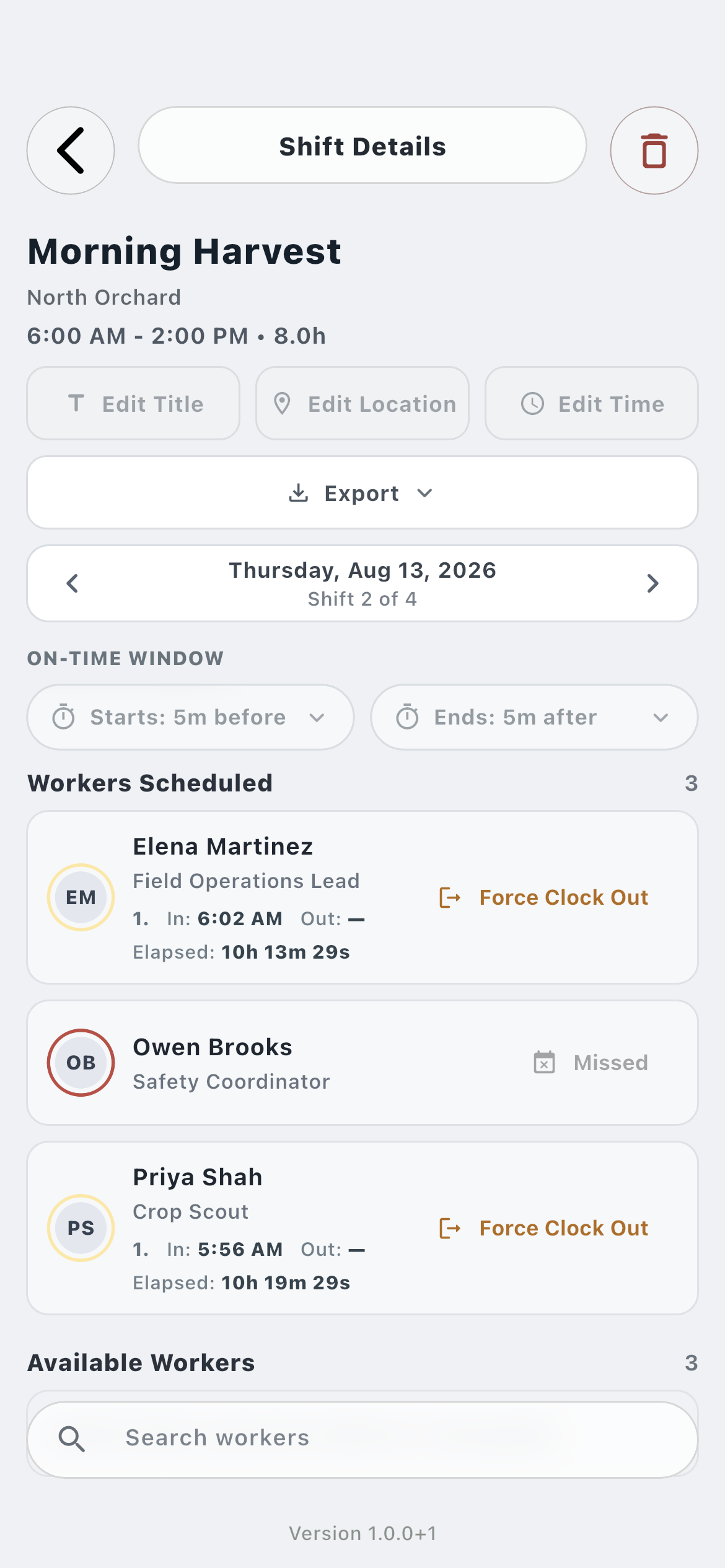
Farm time review03
The farm receives those sessions with attendance classification, elapsed time, missed state, and Force Clock Out when a session remains open.
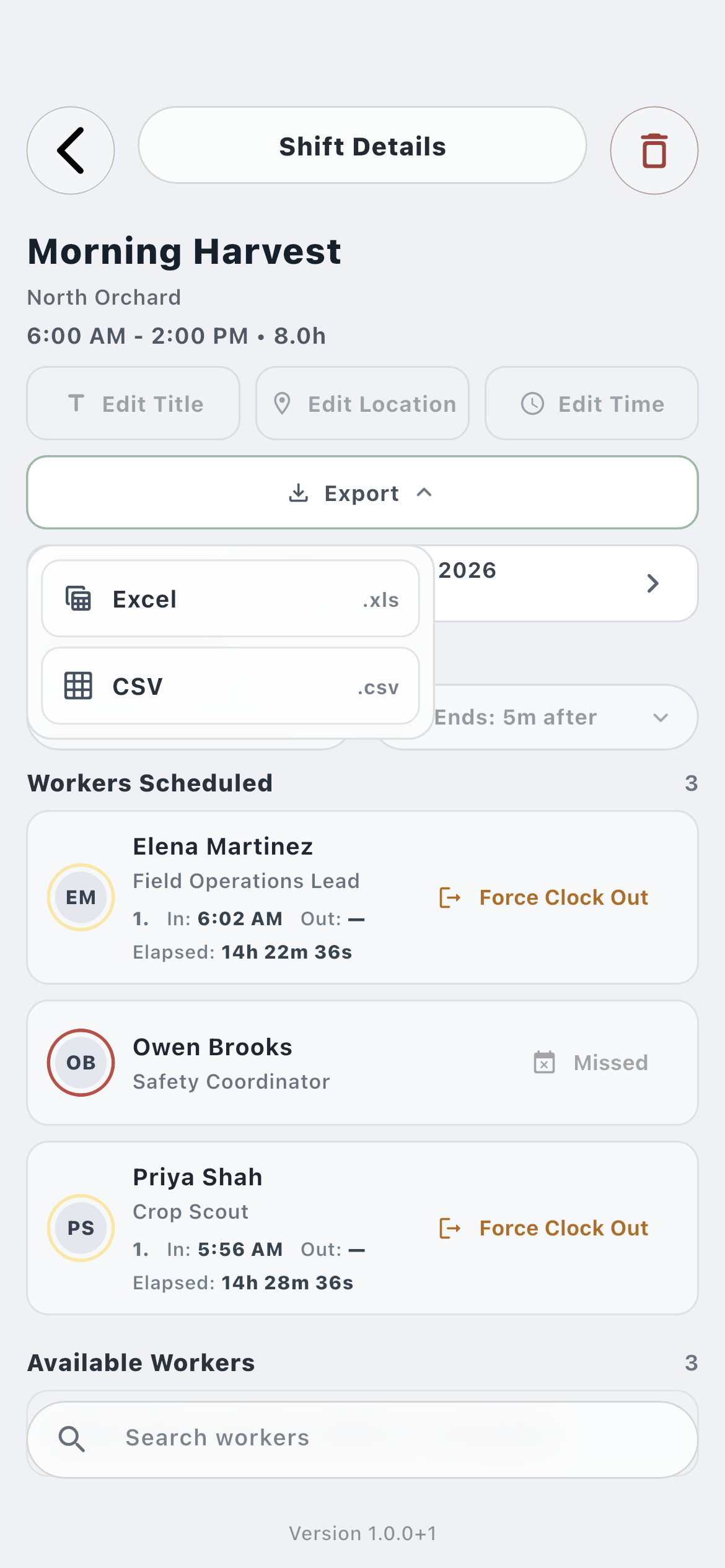
Time export04
The finalized farm time record can be exported with its exact worker and shift details.
How it works in practice
Built around the workday.
01
Employee
A mobile time clock attached to the assigned shift.
The worker does not create an unstructured time entry. Clock In opens the shift already assigned by the farm, records an exact timestamp, and unlocks ordinary operational tasks for the active work session.
Clear Clock In and Clock Out controls
Clock-in availability shown before work
Assigned template forms remain available off the clock
02
Work sessions
Breaks do not erase the day’s earlier time.
An employee can clock out and clock back into the same shift. Farmroute appends another session, preserving every clock-in and clock-out pair and calculating elapsed work from the exact timestamps rather than one rounded block.
Multiple sessions per scheduled shift
Exact second-level duration
Current shift remains accessible while a session is open
03
Farm record
Turn worker actions into attendance and gross-pay inputs.
Each session reaches the farm profile as live attendance and remains part of the finalized shift. The exact duration can feed gross-pay estimates using the rate snapshot attached to the work, while exports preserve the underlying times for review.
Early, on-time, late, and missed classifications
Farm force clock-out after scheduled end
Exact hours retained for gross-pay estimates
Roles and responsibility
Who does what.
Employee profile
Record time from the shift being worked.
The worker clocks in, clocks out for breaks, and resumes from the current shift. Farmroute keeps every work session instead of replacing the earlier part of the day.
Availability and accepted time are distinct
Past-end state remains actionable
Completed work moves to history after clock-out
Farm profile
Receive live attendance and precise time records.
The farm sees the worker’s clock-in, clock-out, elapsed duration, and attendance considerations, then retains those sessions for exports and gross-pay estimates.
Force a clock-out after scheduled end
Export seconds, not rounded display hours
Distinguish timing issues from a true missed shift
Complete workflow
From start to finish.
01
Farm
Assign the scheduled shift
The farm gives the employee a dated shift with start time, end time, location, and an on-time classification window.
02
Employee
Review clock-in availability
The current shift states whether clock-in is available and shows the farm’s accepted time or time range without treating that label as the stored timestamp.
03
Employee
Clock in
Farmroute records the exact universal timestamp, displays it in the appropriate local time, updates farm attendance, and unlocks clock-gated operational tasks.
04
Employee
Clock out for a break
Clock Out closes the active work session and preserves its start, end, and elapsed duration.
05
Employee
Clock back into the shift
A later Clock In appends another session to the same shift instead of replacing the first session.
06
Farm
Review attendance considerations
Farmroute compares each exact timestamp with the configured start window and scheduled end to identify early, late, missed, or still-working states.
07
Farm
Resolve an open session
If a worker remains clocked in after the shift ends, the employee can still clock out and the farm can force the final clock-out when necessary.
08
Farm
Use finalized hours
The completed sessions provide precise duration for shift exports and gross-pay estimates without converting the display into a less precise source record.
Questions and answers
Frequently asked questions.
How does a farm employee clock in with Farmroute?
The employee opens the current assigned shift in Schedule and taps Clock In. Farmroute records the exact timestamp and updates the corresponding farm shift and attendance view.
Can an employee clock out for a break and clock back in?
Yes. Every Clock In and Clock Out pair becomes a separate session on the same shift, so breaks do not overwrite time worked earlier in the day.
What happens if an employee is still clocked in after the shift ends?
The shift remains accessible to the employee and is highlighted for the farm. The worker can clock out normally, or the farm can force a clock-out after the scheduled end.
How does Farmroute determine early, on-time, late, or missed attendance?
The farm configures an accepted start window. Farmroute compares the exact clock timestamp with that window; a missed shift is recorded only after the shift passes with no clock-in.
Does Farmroute round employee time before calculating hours?
The interface may summarize hours for readability, but the underlying shift, export, and gross-pay calculations use exact session timestamps and retain second-level precision.
Does employee time tracking connect to payroll?
Completed sessions provide exact hours for Farmroute’s gross-pay estimates and use the applicable snapshotted rate. Farmroute does not calculate taxes, withholding, or net pay.
Get started
Build your operation with Farmroute.
We pride ourselves on transparency. No need to call for a quote.